
Executive meetings
An objection lands before you have had time to frame it. Conversation modes recognise objections as well as questions and shape an answer for that moment, not a generic paragraph.
Explore executive meeting supportAcross the conversation — before, during, after
Prepare from your own documents, rehearse difficult questions and get answers with source references during the call. Your knowledge base is searched on your device.
Works with your meeting and calling apps:

Before
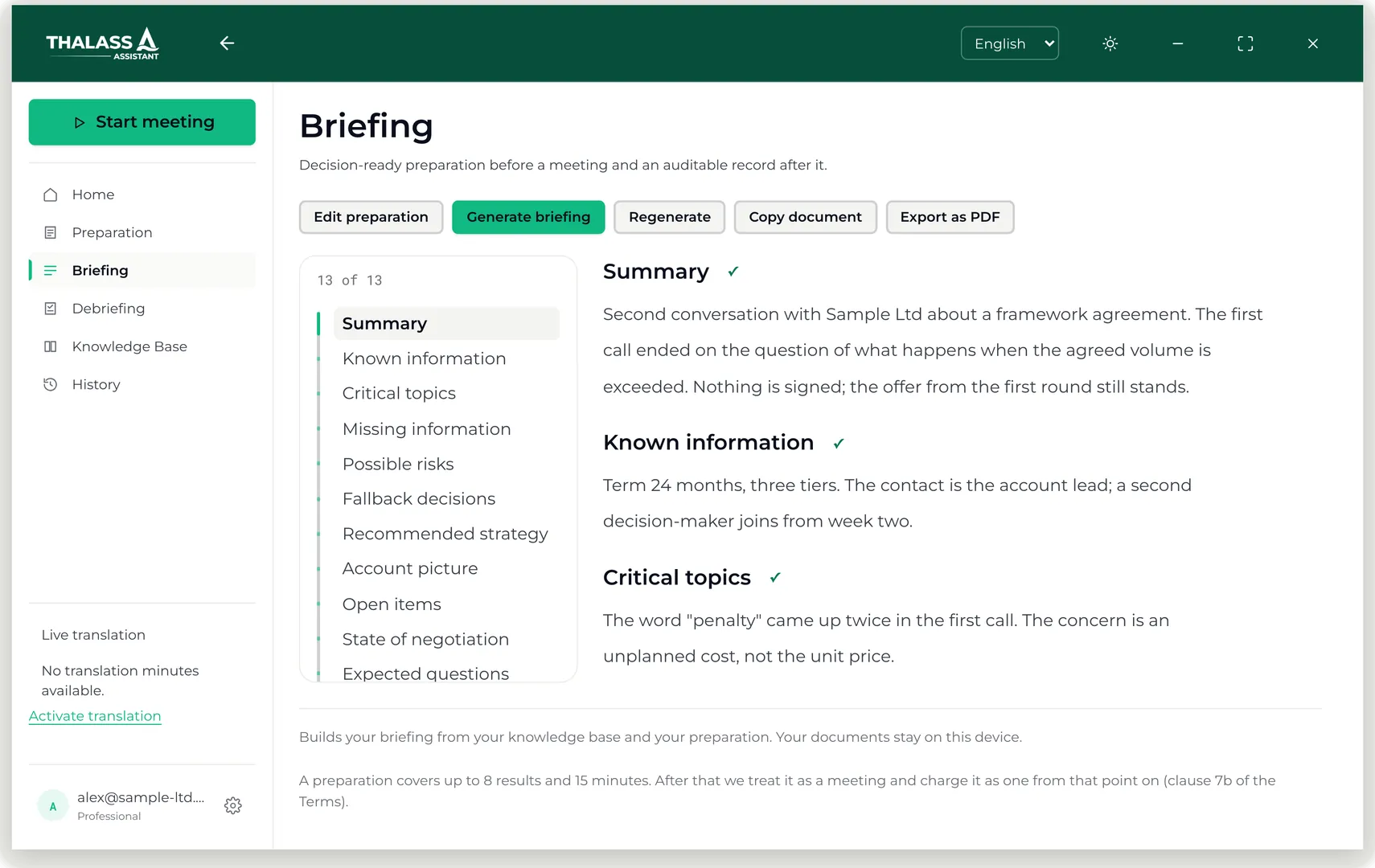
Thalassa reads the documents you upload and writes a briefing before the call — and lets you rehearse the hard questions before anyone asks them.
How the preparation works
During
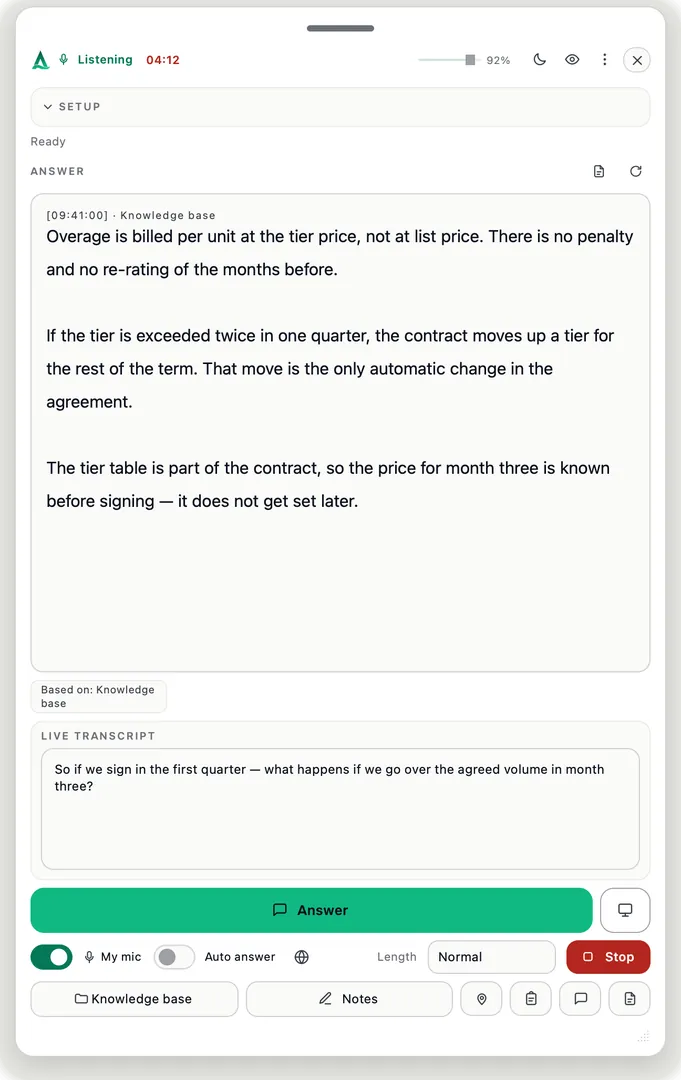
The answer comes from your own documents, searched on your device, and names the document and the page it came from.
What the verified sources cover
After
The debriefing lists what was agreed and what follows from it. The raw transcript is deleted; the index stays on your device.
Security and operations7
Hours a week back
133
Acts and regulations, word for word (Premium)
100 %
Indexed on your device*
0
Bots in your meeting
* The index and search run on your device. Speech recognition and answers use EU cloud services; optional live translation uses DeepL in Germany. Optional web search is processed in the US. Scanned-PDF text recognition can use our Frankfurt backend.
Three situations, one mechanism: the answer comes from your own material while the conversation is still running.
An objection lands before you have had time to frame it. Conversation modes recognise objections as well as questions and shape an answer for that moment, not a generic paragraph.
Explore executive meeting supportTwo weeks between the invitation and the final round, and the questions you dread are the ones you have never answered out loud. Rehearsal mode interviews you on your own CV and the job ad, and the debrief tells you what landed.
Practice job interviewsYou know the material, but nobody has asked you the uncomfortable questions yet. Rehearsal mode asks them from your own lecture notes and reading list, and the debrief shows what you actually knew.
Explore study and exam supportOne quick question can change the meeting. Watch Thalassa Assistant turn your documents into a briefing, a rehearsal, a sourced answer and a written debrief with a draft follow-up e-mail. AI actors tell the story; the app screens are real, with example content.
Try one meeting freeNo card needed.
Every subscription includes every conversation type. What sets the plans apart are the meeting-hours on each card.
Standard · Professional · Premium:
The entry point: every conversation type, answers while you talk.
Every conversation type — and the debriefing after every session.
Every conversation type, full capacity.
Enter your university e-mail address to unlock the student rates.
Students · One-Go Ticket:
Cancel any month. For a busy semester.
The whole degree, at the lowest rate we offer.
University e-mail address required — see the box below.
Buy Monthly Buy YearlyA single exam or interview. No subscription.
University e-mail address required — see the box below.
Buy the One-Go TicketOne important conversation, fully covered — 30 minutes per credit, plus 30 minutes' grace if it runs over, one conversation type of your choice, 500-page knowledge base, debriefing included, and rehearsal before the real thing. For use only where assistance is permitted.
1 Credit·60 Minutes
How credits work: One credit covers a 30-minute meeting, plus 30 minutes' grace if it runs over — 60 minutes in total. Meetings are never cut off: a longer conversation simply draws the next credit from your balance. Unused minutes can also fund a separate meeting.
Team deployment, admin controls, dedicated onboarding. Pricing on request — per seat and year.
Live translation is not part of any plan: €0.23 per session minute from prepaid credit — you only pay when you switch it on. Languages and translation prices
Student plans and single meetings include VAT — what you see is what you pay. Business plans (Standard, Professional, Premium) are net prices; VAT is added at checkout.
Full usage terms: Terms & Limits
Monthly plans: cancel anytime, access until the end of the billing period, no pro-rata refund. Tickets are fully refundable while unused within their window, and non-refundable once a live session has started. Payment disputes are handled by Stripe as our Merchant of Record.
Consumers have a 14-day right of withdrawal, which lapses early if you expressly ask for the service to start immediately and confirm that you lose it — you are asked for that explicitly at checkout, never by assumption. Right of withdrawal
Meeting-hour allowances are generous fair-use limits; see Terms for details. Student plans and single meetings are final prices and include any applicable VAT. The business plans (Standard, Professional, Premium) are net prices; the applicable VAT is added at checkout by Stripe as our Merchant of Record, and the reverse-charge procedure applies with a valid EU VAT identification number.
Briefings, debriefings and the scenario workshop do not count as a meeting and take up no appointment. Their generation time is, however, deducted from the same meeting-hours — one minute of generation like one meeting minute. What you read or leave open afterwards costs nothing. See clause 7b of the Terms.
Premium includes a pre-loaded library of primary public legal and regulatory sources for the jurisdiction you select at the start of each session. Selecting the correct jurisdiction is your responsibility; it is never selected for you automatically. The library reflects publicly available sources as of the last-updated date shown before each session, is refreshed quarterly and may not reflect very recent changes. It is provided for reference only, does not constitute legal, tax or financial advice, and is not a substitute for independent professional judgment.
Read the full disclaimer · What the verified sources cover
Free trial: install the app and create an account — your first meeting is free, with up to 15 minutes of live answer support, plus 5 preparations (briefing, debriefing or scenario workshop), knowledge base capped at ~100 pages. A preparation does not use up the free meeting. The buttons above go straight to checkout. No credit card required.
Every plan searches your knowledge base on your device — see how your data is handled.
Secure checkout by Stripe. Seller of record is Stripe Technology Europe Ltd., which handles VAT and sends the receipt.


Answered the way they would be answered on a call, not the way a brochure would.
No. Thalassa is not a meeting bot: it listens to the sound on your own computer, joins nothing and appears in no participant list. On Windows the window is excluded from screen capture by the operating system; on macOS it stays out of single-window shares — since macOS 15.4 no app can opt out of a full-screen share, so share a single window or move the assistant to a display you are not sharing. A built-in self-test tells you whether it is hidden right now. The other person may notice you reading — which is why you get bullet points, not a script.
No. Audio is never stored, and the transcript exists only during the call and is deleted afterwards. Thalassa is not a note-taking tool that keeps an archive — what remains is the debrief you asked for. Whether you have to tell the other side depends on your country, the kind of conversation and your role; that decision stays yours.
Your knowledge base lives and is searched on your device. Speech recognition and answers use EU cloud services; optional live translation uses DeepL in Germany. Web search sends the search query to Anthropic in the US and can be switched off. Scanned PDFs can be sent page by page to our Frankfurt backend for text recognition; that option can also be switched off.
It says so. If your documents do not contain a suitable passage, the knowledge base is skipped for that answer rather than padded, and the answer is marked as coming from the web or from the conversation. Machine-generated answers can be incomplete or wrong. Check answers and numbers against their sources before using them. The last word belongs to the person speaking.
Yes. Free trial: one meeting with up to 15 minutes of live answers, plus 5 preparations (briefing, debriefing or scenario workshop), with the knowledge base capped at about 100 pages. No card and no payment method, so nothing can renew by itself. The trial starts in the app after you sign up, not on the website.
In professional conversations where you are expected to have the right information — a client meeting, a negotiation, an advisory call — yes; it is not a cheating tool, and getting around examinations is neither supported nor advertised. Whether the other side must be told depends on where you are: many countries let one party’s consent suffice, several US states require every party to consent before a call is recorded or transcribed, and employers and universities set their own rules. Where aids are not permitted, using Thalassa is not permitted — that is in the terms (section 2), not just here.
Windows 10 (build 2004) or newer and macOS 11 or newer, on Apple Silicon and Intel. Zoom, Teams, Meet, Webex or a phone call on speaker — Thalassa listens to the sound on your computer, so there is nothing to connect and no admin approval to chase.
Measured against what? One lost deal, one wrong figure quoted to a customer or one evening of preparation costs more than a month. Measured against a note-taking tool it is expensive — but that tool solves a different problem. If your conversations do not turn on your own documents and do not have to be answered live, a general assistant is cheaper and just as good; we would rather say that than sell you the wrong thing.
A general model answers from what it learned — it does not know your 2026 price list, your framework agreement or your case file. Answers here are drawn from your uploaded documents: product specs, price lists, case files. The internet is only a fallback, and when sources conflict, your knowledge base wins.
The transcript is deleted after the meeting, and audio is never stored. A written debrief remains if you choose to save it.
Note-taking and conversation-analysis tools join the meeting as a participant or record system audio, transcribe, and store. No bot joins your call, and nothing appears in your meeting’s participant list.