
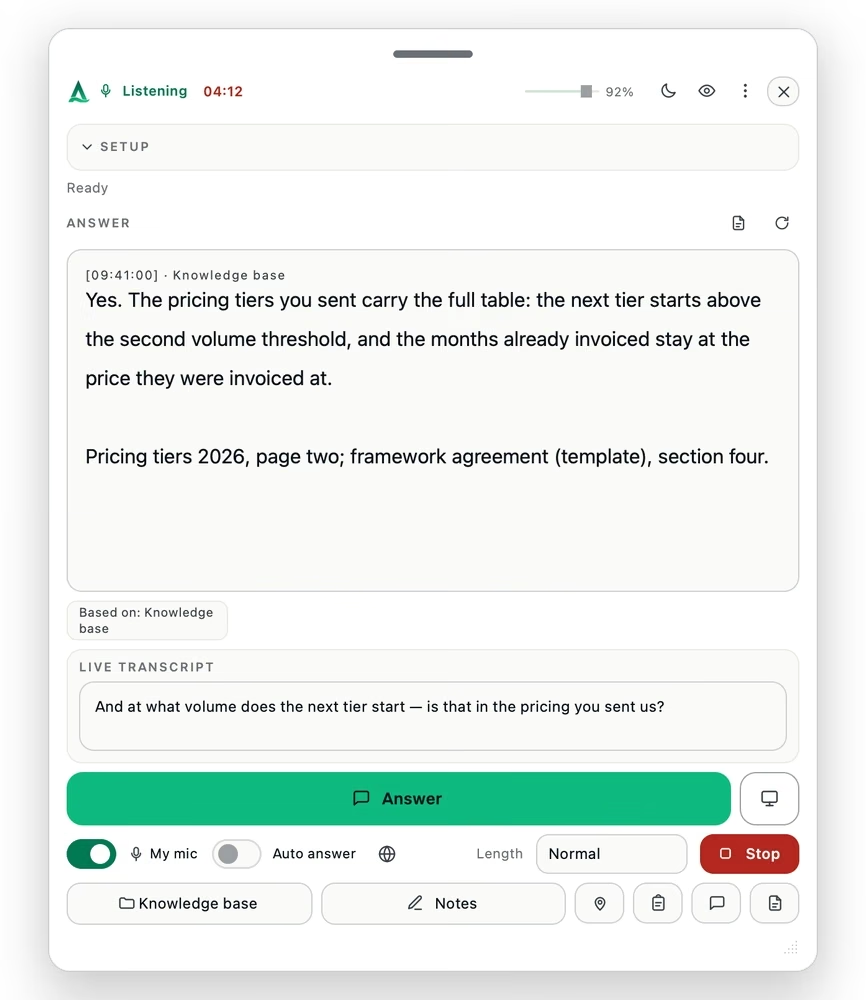
01 · Price and volume
Give the current price or volume tier.
Use the applicable figure from the current price list or offer, with the file and page visible.
Thalassa searches your price lists, proposals, spec sheets and contracts on your device and shows a short answer with its source and page while the buyer is still speaking.

Thalassa searches your price lists, offers, spec sheets and contracts on your device and shows the sourced answer during the call. Upload documents in any language; Thalassa answers in the conversation language. Live translation is optional per session.
Use the applicable figure from the current price list or offer, with the file and page visible.

Bring up the clause, liability cap, specification or lead time without leaving the call.
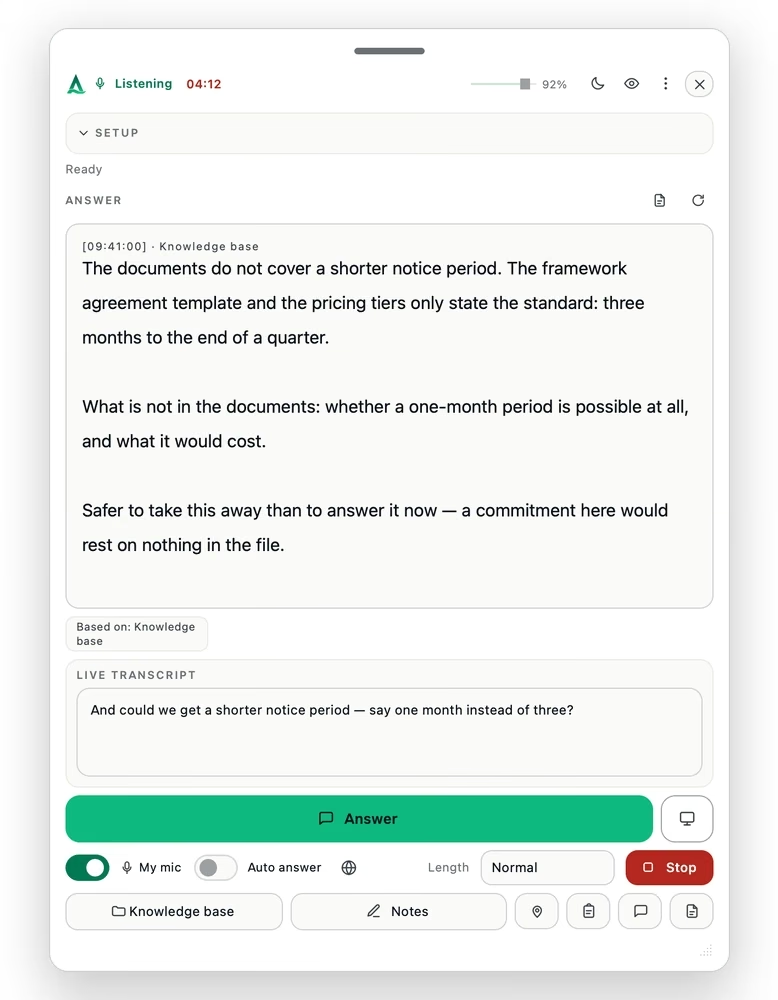
If your documents do not cover the question, Thalassa says so instead of filling the gap.
Every conversation type in every plan; the meeting-hours set the plans apart. Monthly plans can be cancelled any time; annual billing saves more than 20 %. All plans, including single meetings and student rates
The entry point: answers while you talk, the briefing before every call.
€358.80 per year — save €109.20 against monthly billing.
For the account owner: 75 hours of calls a month, and the debrief after every one.
€718.80 per year — save €229.20 against monthly billing.
For the whole catalogue: the deeper knowledge base, 130 hours of calls a month.
€1,198.80 per year — save €349.20 against monthly billing.
Live translation is not part of any plan: €0.23 per session minute from prepaid credit — you only pay when you switch it on.
Standard, Professional and Premium are business rates, shown net; VAT is added at checkout. Single meetings are final prices including VAT. Monthly plans can be cancelled any time, with access until the end of the billing period and no pro-rata refund. Credits are fully refundable while unused within their window, and non-refundable once a live session has started. Consumers have a 14-day right of withdrawal. Secure checkout by Stripe as merchant of record — card details are entered on Stripe’s page and are never visible to us. Terms · Right of withdrawal
The film below shows the desktop app and the assistant overlay in the current release, with example content. English release.
No. It is not a meeting bot: it listens to the sound on your own computer, joins nothing and appears in no participant list — on Zoom, Teams, Meet, Webex or a phone call on speaker. There is no platform integration to configure and no admin approval to chase, on your side or the customer’s.
No. Audio is never stored — it is streamed for transcription and discarded. The transcript exists only during the conversation and is deleted afterwards; what remains is the debrief and the notes you asked for. Your price lists and contracts are searched on your device and are not uploaded to a server for storage.
In a professional conversation where you are expected to have the right information, yes — and only where assistance is permitted. Whether the other side must be told depends on where you are. In the United States, consent to recording or transcribing a call is governed state by state: many states let one party’s consent suffice, while all-party-consent states — California, Florida, Illinois, Pennsylvania and Washington among them — require every participant to agree before a call is recorded or transcribed, and a transcript is a transcript whether or not it is kept. Several other countries have the same rule. Where it is not permitted, using Thalassa is not permitted — that is in the terms (section 2), not just here. Rehearsing with it beforehand is always yours to decide.
No — and today it does not write at all: no connector reads or writes your data. The sign-in path for Salesforce and HubSpot is built and tested; reading and writing are at different stages per system, and how far each has come is on the connectors page. Once that part is built, the debrief will come back as a draft — a note on the opportunity and, if you release it, updated stage, close date or next step. Nothing would be written without you releasing it.
The knowledge base is searched on your own machine. Documents are not uploaded to a server for storage; the transcript is deleted after the conversation and audio is never stored. Answers are generated in the EU. Two exceptions, named rather than hidden: web search and optional live translation leave that path, and both can be switched off. How your data is handled.
It says so. It does not fill the gap with something plausible — an unsupported number in a sales call is the expensive kind of mistake. The internet is a fallback you can switch on, and an answer from it is marked as such.
On screen, no: the window is excluded from what you share,1 there is no sound, no notification and no extra participant in the call. What the customer may notice is you reading — someone reading an answer aloud sounds like someone reading aloud. That is why you get bullet points and not a script, and why rehearsal mode exists.
Yes. Install the app and create an account — the first meeting is free, with up to 15 minutes of live answers, plus 5 preparations (briefing, debriefing or scenario workshop), knowledge base capped at about 100 pages. A preparation does not use up the free meeting. It is granted in the app, once per account; no card required.