

01 · The client changes direction
Find the relevant fact while they ask.
Bring up the passage from the report, mandate file or standard without breaking the conversation.
Thalassa searches your reports, standards and past project notes on your device and shows the answer with the section it came from. If the file does not cover the question, it says so.

Thalassa searches reports, standards and project notes on your device and shows the sourced answer during the client call. Upload documents in any language; Thalassa answers in the conversation language. Live translation is optional per session.
Bring up the passage from the report, mandate file or standard without breaking the conversation.

Use the exact section from a project note or change request instead of relying on memory.
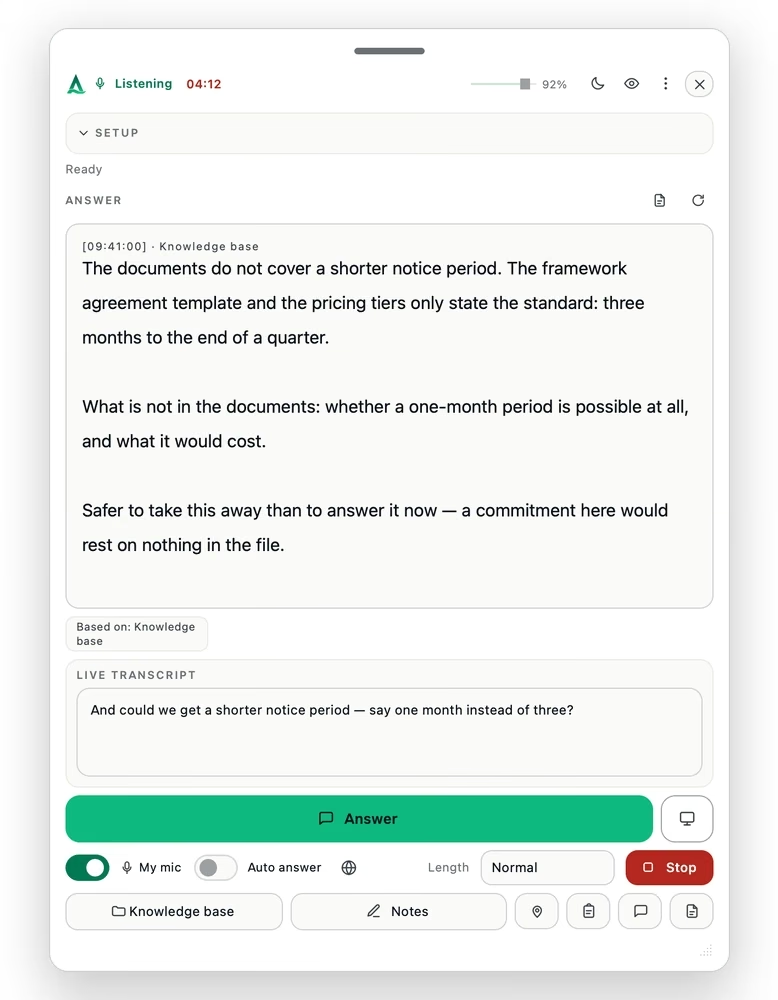
If the material does not cover the question, Thalassa says so rather than turning an assumption into advice.
Advisory, technical and training conversations in both plans; the meeting-hours and the size of the knowledge base set them apart. Monthly plans can be cancelled any time; annual billing saves more than 20 %.
For one adviser: 75 hours of client calls a month, the briefing before and the debrief after every one.
€718.80 per year — save €229.20 against monthly billing.
For the whole practice’s material: the 5,000-page knowledge base, 130 hours of calls a month.
€1,198.80 per year — save €349.20 against monthly billing.
Live translation is not part of any plan: €0.23 per session minute from prepaid credit — you only pay when you switch it on.
Professional and Premium are business rates, shown net; VAT is added at checkout. Monthly plans can be cancelled any time, with access until the end of the billing period and no pro-rata refund. Consumers have a 14-day right of withdrawal. Secure checkout by Stripe as merchant of record — card details are entered on Stripe’s page and are never visible to us. Terms · Right of withdrawal
The film below shows the desktop app and the assistant overlay in the current release, with example content. English release.
No. It is not a meeting bot: it listens to the sound on your own computer, joins nothing and appears in no participant list — on Zoom, Teams, Meet, Webex or a phone call on speaker. There is no platform integration to configure and no admin approval to chase, on your side or the client’s.
No. Audio is never stored — it is streamed for transcription and discarded. The transcript exists only during the conversation and is deleted afterwards; what remains is the debrief you asked for. Your reports and mandate files are searched on your device and are not uploaded to a server for storage.
Professional codes and client confidentiality come first. Whether you may have a client conversation transcribed, and whether the client must be told, is governed by your professional rules and by where you are: many countries let one party’s consent suffice, several US states require every party to consent before a call is recorded or transcribed, and a profession bound to secrecy answers to its own code before any product’s terms. Thalassa does not make that decision for you. What it does is keep the decision small: the transcript is deleted after the call, audio is never stored, and your documents stay on your machine. Where aids are not permitted, using Thalassa is not permitted — that is in the terms (section 2), not just here.
As good as the material you put in. With the firm’s reports and standards in the knowledge base, an answer from a neighbouring field is grounded in a real document, with its section — and where nothing covers the question, it says so instead of guessing. The briefing tells you before the call what the file does not cover.
Today no connector reads or writes your data. The sign-in path for Microsoft 365, Google Workspace, Salesforce and HubSpot is built and tested; reading and writing are at different stages per system, and how far each has come is on the connectors page. Once that part is built, entries will come back as a draft you release, never as an automatic write.
On screen, no: the window is excluded from what you share,1 there is no sound, no notification and no extra participant. What the client may notice is you reading — which is why you get bullet points and not a script. Whether you tell them is your decision, and it depends on your country, the kind of conversation and your profession; Thalassa does not make that decision for you.
Yes. Install the app and create an account — the first meeting is free, with up to 15 minutes of live answers, plus 5 preparations (briefing, debriefing or scenario workshop), knowledge base capped at about 100 pages. A preparation does not use up the free meeting. It is granted in the app, once per account; no card required.